
THE DEALER'S GUIDE TO AUTOMOTIVE STANDARDS COUNCIL (ASC) COMPLIANCE
How to audit your GA4 event tracking, vendor by vendor, and fix the gaps that skew your reporting.
Most dealers assume they are ASC compliant because their website provider is ASC certified. In the audits Generations Digital runs for dealerships, that assumption is usually only half true. The website is firing ASC events, but the chat tool, digital retailing tool or trade-in tool is not, or is sending events to the wrong GA4 property.
This guide walks through how to find out where your dealership really stands and what to do about it. New to the ASC? Start with our overview, Understanding the Automotive Standards Council (ASC) for GA4, then come back here.


WHAT "ASC COMPLIANCE" ACTUALLY MEANS
ASC compliance is not a legal or regulatory requirement. There are no fines and no inspectors. The Automotive Standards Council is an industry group that publishes a voluntary data standard for tracking dealership websites in Google Analytics 4 (GA4).
For a dealership, being ASC compliant means three things are true at the same time:
Every vendor sends ASC events
Each tool on your website (website platform, chat, digital retailing, trade-in, service scheduling, call tracking) fires its interactions using the standard ASC event names and parameters.
The events land in the right place
Each vendor is sending to your dealership's GA4 property, using the correct Measurement ID for each rooftop.
Your GA4 property is set up to use them
The ASC parameters are registered as custom dimensions, and the right events are marked as key events, with no double counting.
Miss any one of the three and your reports will look complete while quietly leaving out leads.
VENDOR CERTIFICATION VS. DEALER COMPLIANCE
These two terms get mixed up constantly. ASC certification applies to a vendor's product: the ASC has reviewed that the product can fire events to the standard. ASC compliance applies to your dealership: every product on your site is actually configured and sending data correctly to your GA4 account.
A certified product is a good start. It is not proof that your rooftop is compliant.
WHY A CERTIFIED WEBSITE DOESN'T MAKE YOUR DEALERSHIP COMPLIANT
Your website provider is only responsible for its own events. It does not collect events from the third-party tools running on your site. Each vendor sends its own data, and each one can break independently. These are the gaps we find most often:
-
A vendor was never given your Measurement ID. The tool supports ASC, but nobody told it where to send the data.
-
Wrong Measurement ID on multi-rooftop groups. Store A's chat leads show up in Store B's GA4 property, or all stores report into one.
-
Legacy events still firing. An old Google Tag Manager tag or a vendor's pre-ASC setup sends a second, non-ASC version of the same action, inflating lead counts.
-
A website switch reset everything. After changing website providers, old key events stay marked while the new ASC events are never set up.
-
Custom dimensions not registered. The parameters arrive in GA4, but without custom dimensions you can't see them in reports.
-
Double-counted key events. Both the general form event and the departmental form events are marked as key events, so every lead counts twice.
-
A tool that doesn't support ASC at all. Smaller or newer vendors may send their own event names or nothing.

HOW TO AUDIT YOUR DEALERSHIP'S ASC COMPLIANCE IN 7 STEPS
You can run this audit yourself in GA4. Plan to repeat it after any vendor change and at least once a quarter.
List every vendor on your website
Build a simple inventory of every tool that runs on your site. Each one owns its own ASC events.

Check the current ASC specification at automotivestandardscouncil.com for the full event list.
Confirm ASC support and Measurement IDs with each vendor
Contact every vendor on the list. Get written confirmation that their product supports the ASC specification, and give them the correct GA4 Measurement ID for each store.Use the vendor checklist below.
Test every tool and watch the events arrive
Open GA4 Realtime or DebugView, then act like a shopper on your own site. Submit a test lead form, tap the phone number, start a chat, begin a deal in digital retailing and value a trade. Each action should show up as an event starting with "asc_". Anything that doesn't appear is a gap.
Check the parameters, not just the event names
Click into each event in DebugView. Confirm it carries the details that make it useful, such as department, form type, vehicle information and which vendor sent it. An event with empty parameters will count leads but can't tell you which vehicle or department they came from.
Register the ASC custom dimensions
In GA4, go to Admin, then Custom definitions, and register the ASC parameters as custom dimensions. Full ASC tracking calls for 35 custom dimensions. Custom dimensions only collect data from the day you create them forward, so set them up as early as possible.
Set your key events, once
Mark the events that represent a shopper contacting the dealership: lead forms, phone calls, chat and SMS leads, and digital retailing at a meaningful completion point. Mark either the general form event or the departmental form events, not both, or GA4 will double count. Remove stale key events left over from old vendors.
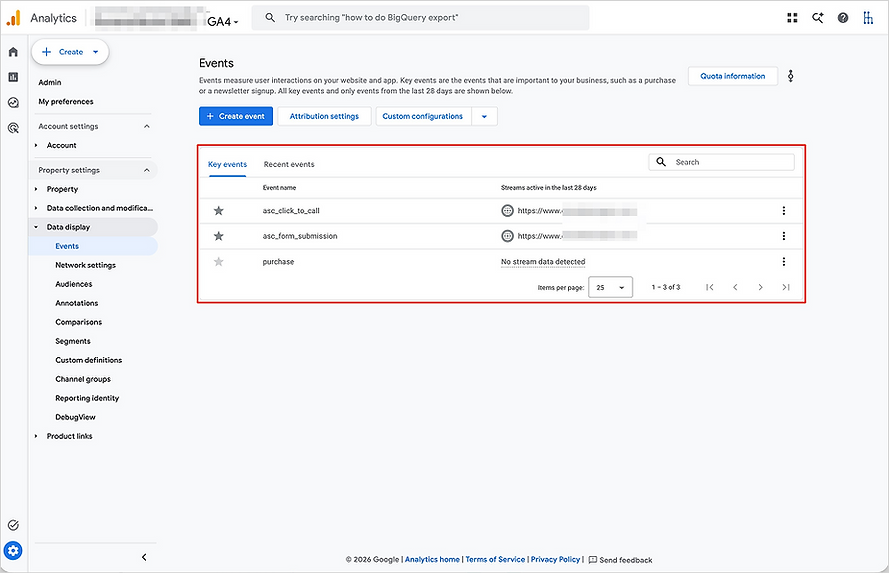
Hunt for duplicates and compare to your CRM
In GA4, go to Reports, then Engagement, then Events. Look for non-ASC events that duplicate ASC ones (for example, an old form event firing alongside asc_form_submission). Then compare GA4 lead counts to your CRM for the same period. A big difference in either direction points to missing or duplicate tracking.
ASC COMPLIANCE CHECKLIST: QUESTIONS TO ASK EVERY VENDOR
Send these questions to each vendor on your website and keep the answers on file.
Send these questions to each vendor on your website and keep the answers on file.
Which ASC events does your product send?
Do you send events directly to our dealership's GA4 property, or only to your own analytics?
Where do we enter our GA4 Measurement ID, and how do you handle multiple rooftops?
Do you still fire any non-ASC events that could duplicate the ASC ones?
Which of your events do you recommend we mark as key events?
How will you notify us when the ASC specification changes?
If a vendor can't answer, or says they don't support ASC, ask for a timeline. If there isn't one, that is worth weighing at your next contract renewal.

WHAT COMPLIANT ASC DATA LETS YOU REPORT ON
Once every vendor is sending clean ASC events, your reporting gets far more useful. Because every tool uses the same event names, you can finally compare them fairly:
-
Vendor vs. vendor: Is your chat tool producing more leads than your digital retailing tool? Is a new vendor actually outperforming the one it replaced?
-
Store vs. store: Dealer groups can compare rooftops on the same definitions, regardless of which vendors each store uses.
-
Department view: See sales, service and parts leads separately instead of one blended number.
-
Vehicle-level insight: Connect vehicle detail page views and leads to the specific year, make and model shoppers engaged with.
-
Advertising ROI: Clean key events can be imported into Google Ads, so campaigns optimize toward real dealership contacts instead of inflated or missing counts.
HOW GENERATIONS DIGITAL HELPS DEALERS WITH ASC COMPLIANCE
Generations Digital provides digital marketing consulting and GA4 reporting for car dealers, RV dealers and dealer groups. We help dealerships:
-
Audit ASC compliance across every vendor on the website, rooftop by rooftop.
-
Fix GA4 configuration, including custom dimensions, key events and duplicate events.
-
Build reporting that turns ASC data into clear monthly reports for owners and general managers. See our GA4 reporting for car dealers.
-
Train your team through our GA4 Training Program and free GA4 tutorial videos.
FREQUENTLY ASKED QUESTIONS ABOUT ASC COMPLIANCE
CONTACT
Please contact us, we will quickly get back to you!